Manage Teams
Owner’s Manage Teams
Where you form the teams. It shows:
Projects: each approved project with its teams
Unassigned: confirmed participants without a team
Filters and cards: registration answers and preferences
Spreadsheet: download and upload a CSV
It might also show:
Teams are fixed: once teams are published or work is handed in
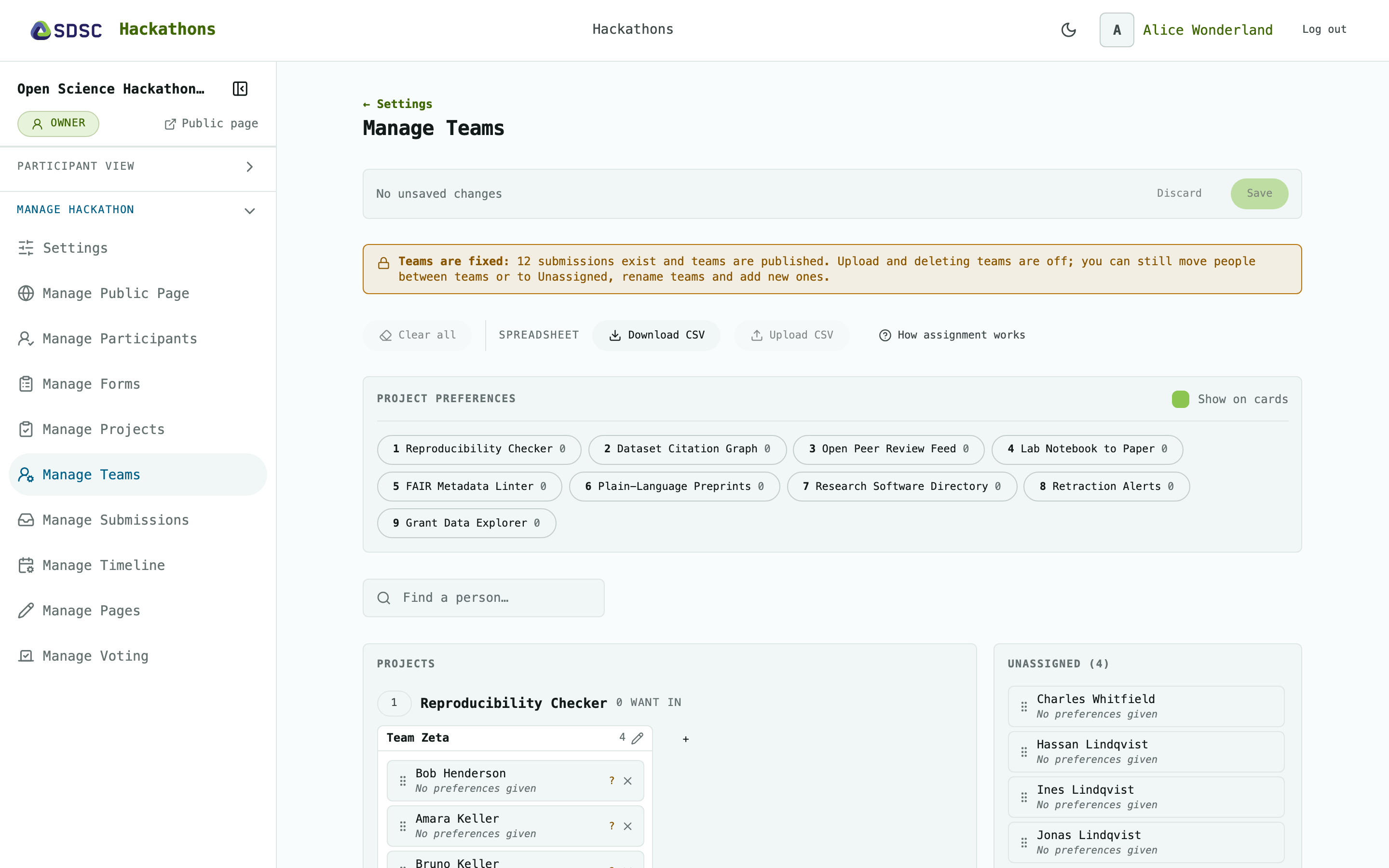
Projects
One card per approved project, with N want in and its teams.
Click + Add Team to add a team. You can also rename or delete a team.
Drag people between teams.
Unassigned
Filter by registration answer or preferred project. Click Reset filters to clear them.
Filters and cards
Registration questions: give each question a short name and filter by its answers. Tick Show on cards to show the answers on each person. See Manage Forms.
Project preferences: what participants chose on Projects.
Enter a name in Find a person to search the page.
Spreadsheet
Click Download CSV to get everyone with their preferences and answers.
Edit the
projectandteamcolumns, then click Upload CSV. It replaces all teams.Click How assignment works for the format.
Saving
Nothing is stored until you click Save. Click Discard to drop your changes.
Saving deletes empty teams.
Participants see the teams only once you let them, see Settings.
Teams are fixed
Once teams are published or a team has handed in work: no upload, no deleting teams. Moving people, renaming and adding teams still work.